Before
LEMs signed weeks late
The rep rotated out and nobody delegated. No signature, no service entry sheet, no invoice.
NowLEMs are signed on site or by link the same day, on the contract’s rate sheet, with the PO and work order on them.
Field to Paid · job tracker and invoicing
Every job and every deliverable tracked from the field to the client, then billed from the signed LEM, in QuickBooks Online or by export. And one screen that answers the question every contractor asks when the bank account doesn’t look right: where’s my money?
From $11,000 setup + $850/mo1–25 people who sign in · CAD, plus GST · fixes and updates includedAll prices Job tracker: $5,000 + $500/moQuickBooks invoicing: $6,000 + $425/moBoth together: the price above
What it fixes
A large invoice to a big owner passes through a chain: LEM signed, service entry sheet, approval, the supplier portal, a match, a payment run. Any break restarts the clock. We make your side of that chain airtight, and show you exactly where each dollar is.
Before
The rep rotated out and nobody delegated. No signature, no service entry sheet, no invoice.
NowLEMs are signed on site or by link the same day, on the contract’s rate sheet, with the PO and work order on them.
Before
Callouts and scope growth used up the PO. The work is done; the money waits on an amendment.
NowEvery PO’s value against the signed LEMs, with a warning at 75% so the amendment is asked for in time.
Before
A single disputed line, or missing backup, and the whole invoice goes back to the start.
NowDisputes settled on the LEM before it’s billed. Invoices split by work order, with the signed LEM and test reports attached as backup.
Where’s my money
Each invoice shows the stage it’s at in the owner’s process, how long it’s been there and who it’s waiting on. Your office moves it along as the owner’s system shows it; anything stuck lands on a chase list every Monday, with the facts to escalate with.
Illustration with sample data. No system can make an owner approve faster; this makes your side airtight and shows you where to push.
The job tracker
As-built drawings, test reports, photos, close-out packages and signed LEMs, each followed from the truck to the client. The crew, the office, operations and the client all see the same status.
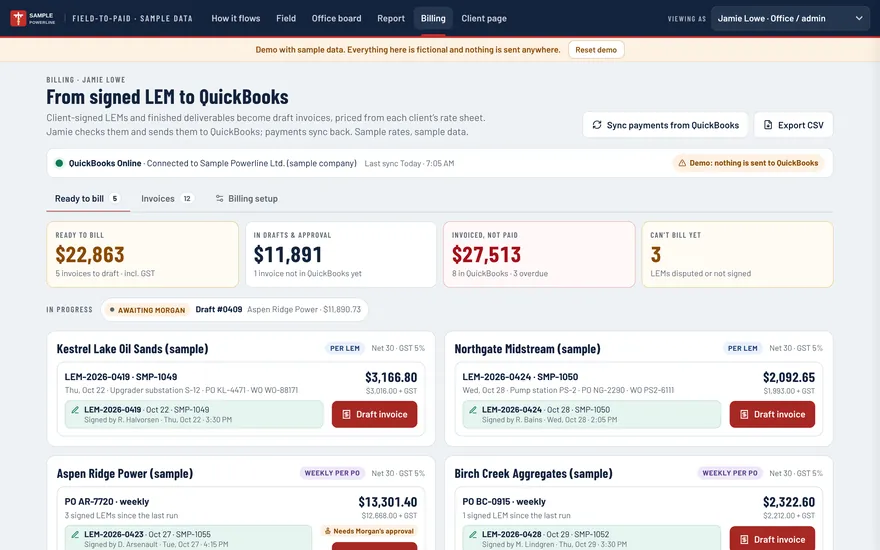
Invoicing
Questions
Priced by company size, not per seat. Fixes and updates included in every monthly.
No. Invoicing connects two-way with QuickBooks Online. For Sage, Vista or anything else, invoices export as CSV and PDF.
Not directly. Each invoice comes out as a package ready to upload: the PO, the work order and the signed backup, together.
No system can make an owner approve faster. What it does is make your side airtight and visible: every invoice carries the PO, work order and signed backup, and you can see which stage it is at and who it is waiting on, so you have the facts to escalate with.
Your office moves an invoice to its next stage when the owner’s system shows it, and the date is kept. It’s a two-click update, not a live feed from the owner’s system, and the tracker is only as current as that update.
Every purchase order’s value against the signed LEMs written under it. You get a warning at 75%, so the amendment is asked for before the work outruns the PO.
The rest of the suite
Next step
In 30 minutes we’ll walk it back through the owner’s stages, find where it stopped, and show you how the next one wouldn’t. Then Field to Paid runs 30 days on your real invoices before the first monthly fee.
Fort McMurray, Alberta · serving contractors across Canada