Your clients’ work orders, from their SAP or Maximo backlog, on one board with every trade. Checked ready before anyone is booked, scheduled week by week, costed against budget, and scored on schedule compliance and backlog KPIs, with your client’s definition agreed at setup.
From $12,000 setup + $1,250/mo1–25 people who sign in · CAD, plus GST · fixes and updates includedAll prices →
Backlog
Ready to schedule
Weekly schedule
PMs
Cost vs budget
KPIs
Week 46 · frozen and publishedSample data
Mon
Tue
Wed
Thu
Fri
Line crew 1
Recloser PMPoles, km 61Patrol F7
Line crew 2
Storm damageTransformer
Ground crew
Yard PMAnchorsBreak-in
HV cable
Splice, Feeder 3
Next week, built from ready work. Freeze it, publish it, count the break-ins.
What it fixes
Planned like the owner plans. Scored before they score you.
Before
The backlog is a spreadsheet
The client’s export, retyped into yours, with their work order numbers lost along the way.
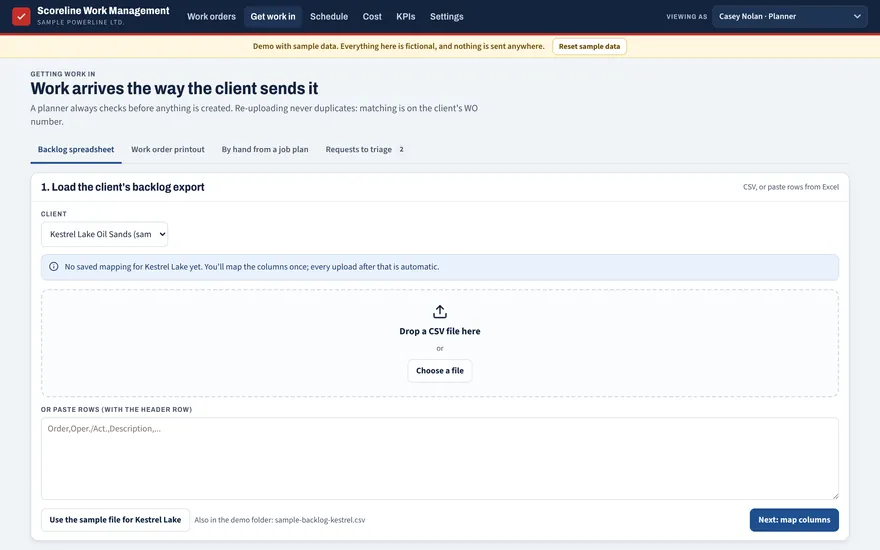
NowUpload the client’s backlog as it comes. Columns are mapped once; every upload matches on their work order number, no duplicates.
Before
Crews booked, then stopped
The parts aren’t in, the permit isn’t ready, the truck is out of service. The day is gone.
NowA ready check before anyone is booked, such as crew tickets, materials, rentals, the permit or switching order, and the PO. You set each check per client. Overrides and skips are logged.
Before
KPIs you hear about late
The owner tells you your schedule compliance at the quarterly review. You had no idea.
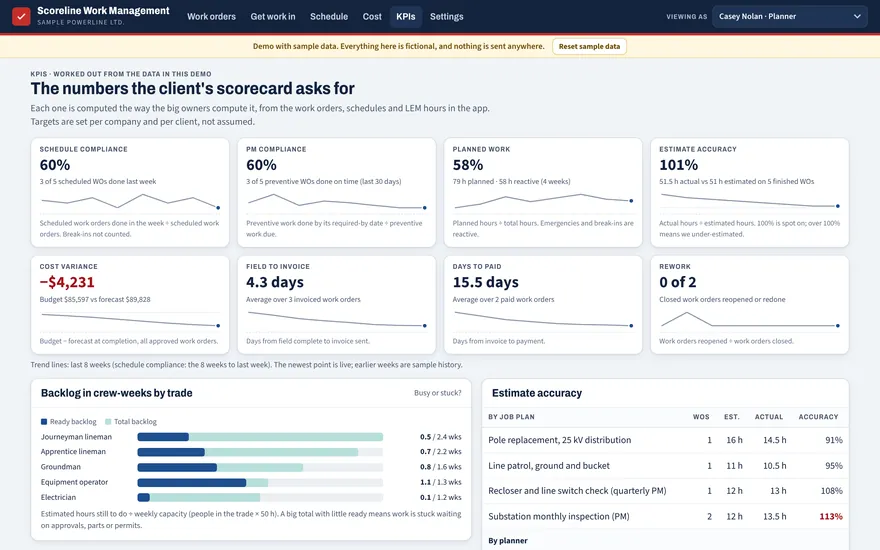
NowSchedule compliance, PM compliance and backlog in crew-weeks, worked out from your own data, with your client’s definition agreed at setup. Every formula is shown.
The week
Build, check, freeze, publish.
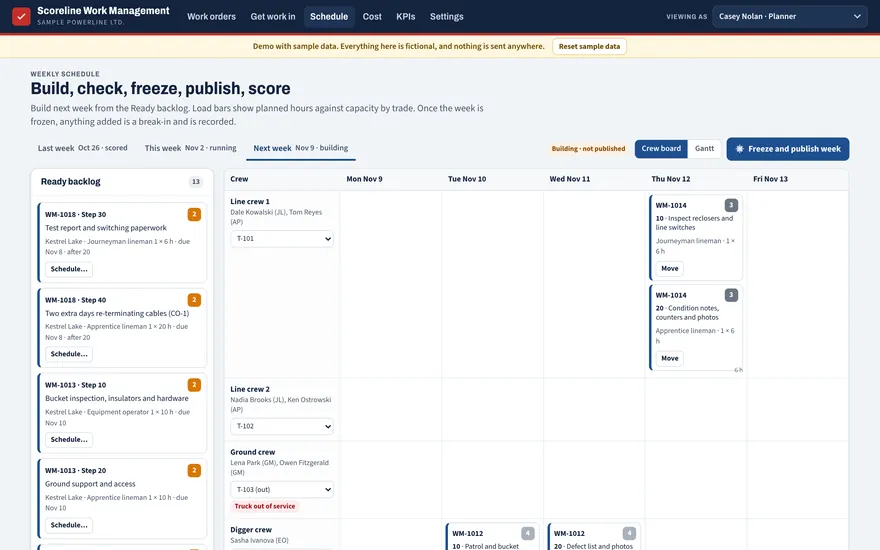
Next week is built from the ready backlog. Load bars show planned hours against capacity by trade. Once the week is frozen, anything added is a break-in, and it’s counted.
Weekly schedule · week 46Sample data
Crew
Mon
Tue
Wed
Thu
Fri
Line crew 1JL · JL · AP
WM-1014Recloser and switch check
WM-1021Pole replacement, km 61
WM-1021Pole replacement, km 61
WM-1030Line patrol, Feeder 7
Line crew 2JL · AP · EO
WM-1019Storm damage, km 58
WM-1019Storm damage, km 58
WM-1024Transformer change-out
WM-1024Transformer change-out
Ground crewGM · GM · EO
WM-1017Yard lights and panel PM
WM-1026Anchor and guy repairs
WM-1027Break-in: feeder trip
Schedule compliance60%Scheduled work done in its frozen week. Your client’s definition is agreed at setup.
PM compliance60%Preventive work done by its required date.
BacklogReady vs totalIn crew-weeks, by trade. A big total with little ready means work is stuck waiting on approvals, parts or permits.
Break-ins1Added after the freeze, with a reason.
Illustration with sample data.
MonTueWedThuFri
How it works
From the client’s export to the client’s KPIs.
01
Work arrives the way the client sends it
Load the client’s backlog export, add a work order by hand, or start from a job plan. Their work order number and user status sit next to yours.
Get work in · sample data
02
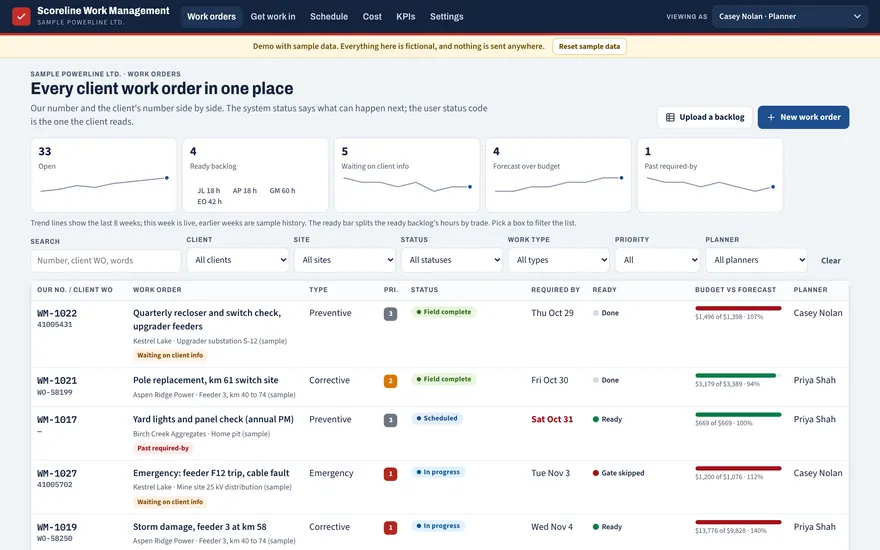
Every work order, one place
Status, priority, required-by date, ready check and budget against forecast for every job, filtered by client, site, planner or trade.
Work orders · sample data
03
The weekly schedule
Put ready work onto crews by day. Load shows hours against capacity. Freeze and publish the week; break-ins are tracked with a reason.
Schedule · sample data
04
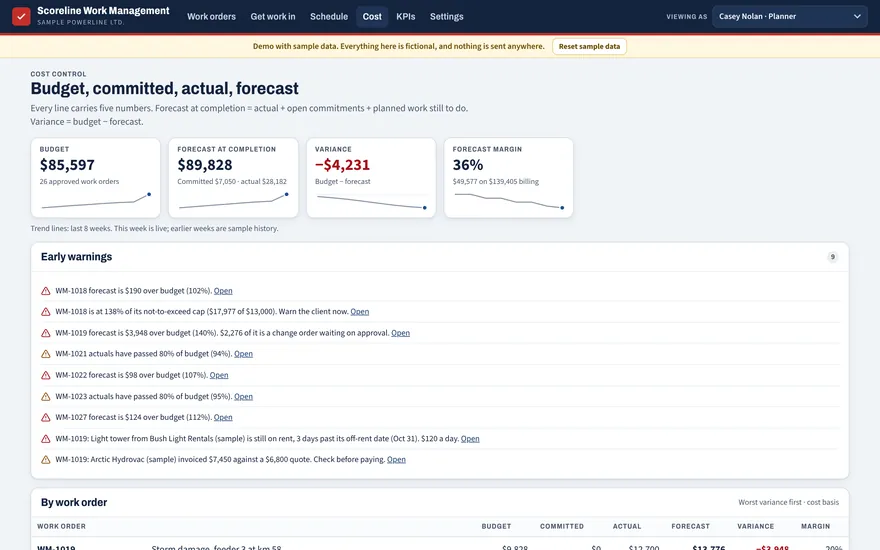
Cost, with early warnings
Budget, committed, actual and forecast on every line. Warnings when a job passes 80% of budget or a not-to-exceed cap, before the client hears about it.
Cost · sample data
05
The scorecard
Schedule compliance, PM compliance, planned work, estimate accuracy, backlog, days from field to invoice and rework, each worked out from the data already in the system.
KPIs · sample data
Work Management · sample data
Questions
About Work Management.
Priced by company size, not per seat. Fixes and updates included in every monthly.
Can it take our client’s SAP or Maximo backlog?
Yes. Upload the client’s backlog export as a spreadsheet. You map the columns once per client; after that every upload is matched on the client’s work order number, so nothing is duplicated. It doesn’t write back into the client’s system.
How are the KPIs worked out?
From the data already in the system: schedule compliance, PM compliance and backlog in crew-weeks, with each formula shown on the KPI page. Owners count these differently, so your client’s definition is agreed at setup.
What does “ready to schedule” mean?
A work order only goes on the schedule when its ready checks are done, for example: steps planned, the PO and line on file, materials received, rentals booked, the permit or switching order requested and crew tickets valid. Each check can be required, recommended or off per client. Overrides and emergency skips are logged with who and why.
How long does it take to set up?
Longer than the crew app: client profiles, column mapping, rate sheets and job plans. We start with one client, run it for 30 days on real work before the first monthly fee, then add the rest.