Safety & LEM crew app
The LEM writes itself from the FLRA.
FLRAs, JHAs, client permits, the truck and gear checks, and the LEM, on the foreman’s phone. It works with no signal. Nobody writes the hours twice, and the client’s rep signs the LEM at the tailgate or from a link.
From $6,000 setup + $750/mo1–25 people who sign in · CAD, plus GST · fixes and updates includedAll prices
For the crew first
Less paperwork for the people doing the work.
- The LEM drafts itself
Hours are drafted from the FLRA start and close-out times. The foreman checks them, the client signs the final hours, and nobody writes them twice.
- The gear check never strands you at 6 am
Out-of-date gear is flagged before you leave the yard. Swap it, tag it out, or a supervisor overrides with a reason that goes on the record.
- No work email needed
The sign-in code goes to any email address, or the foreman signs the crew on. Big buttons, screens you can read in the cab.
- Location only on the form
Stamped on the forms you fill in, to show where the work was done. Never tracked in between, and you can say no. More
The guardrails
Safety records, kept straight for your auditor.
Every record dated, signed and change-tracked. It doesn’t make you COR certified: your audit still includes interviews and observation, and certification is your Certifying Partner’s decision. What the app does is keep the paper side honest:
- Hazards before signatures
The crew can’t sign on to the FLRA until every hazard has its controls.
- Permits handed back
Try to close out the FLRA with a client permit still open and it stops, names the permit, and takes you to it.
- Corrective actions tracked to closed
Each one is assigned with a due date, and overdue ones are flagged. It closes with a completion date and a signed sign-off, and who closed it and when stays on the record.
- Nothing is deleted
A mistaken line is voided with a reason. The original stays on the record.
- Overrides on the record
A supervisor can override a failed truck or gear check, with a reason that is recorded.
- Good-faith near misses
Anyone can file a near miss on the spot. No one is disciplined for reporting in good faith.
One day, real screens
One day on the job, on one phone.
Real screens from the app, with sample data from the powerline tour.
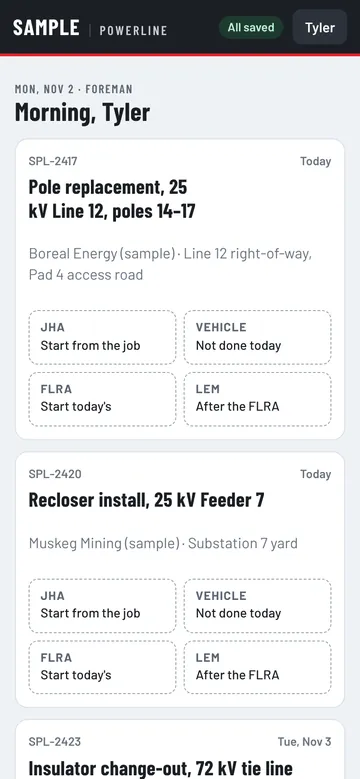
Today’s jobs
The foreman opens the app. Each job shows what’s done and what’s next: JHA, truck check, FLRA, LEM. Nothing to install from a store; the sign-in code goes to any email, or the foreman signs the crew on.
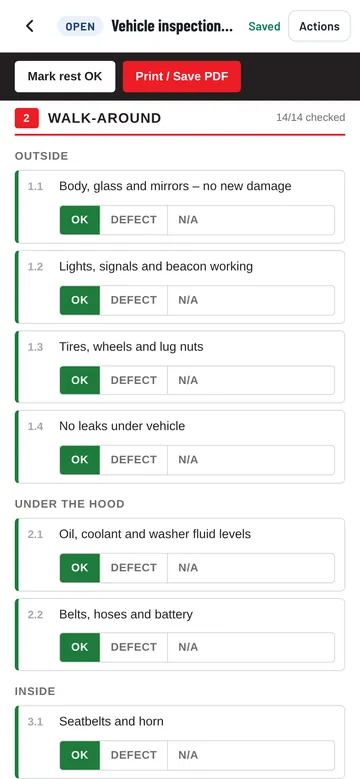
The truck check
Pick the unit; driver, date and job fill themselves in. Check each item and call out the defects. A defect raises an action for the office, and out-of-date gear stops the truck being marked ready, unless a supervisor overrides it with a reason.
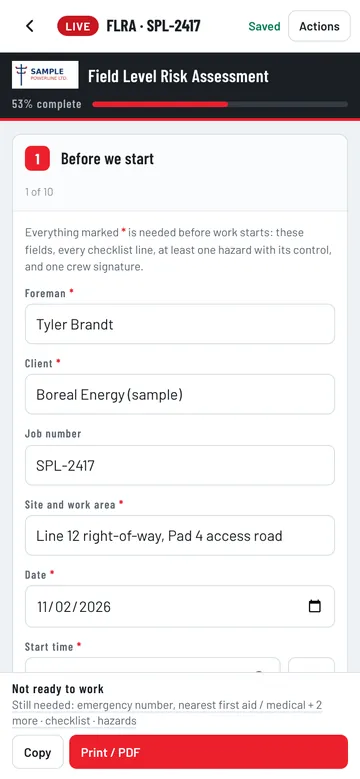
The FLRA, signed by the crew
The JHA comes from the job type, with its hazards, controls and a before-and-after risk rating. Add any hazard the day brings and write its control. The bar shows what’s still needed before work starts. Once the hazards are done, each person signs on with their own finger.
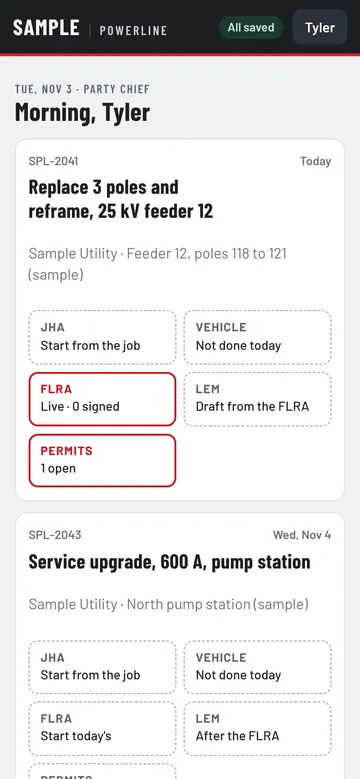
Client permits, alongside
Paper permits from the client are added from the FLRA, signed off by each worker and handed back at the end of the day, with a record the office can see.
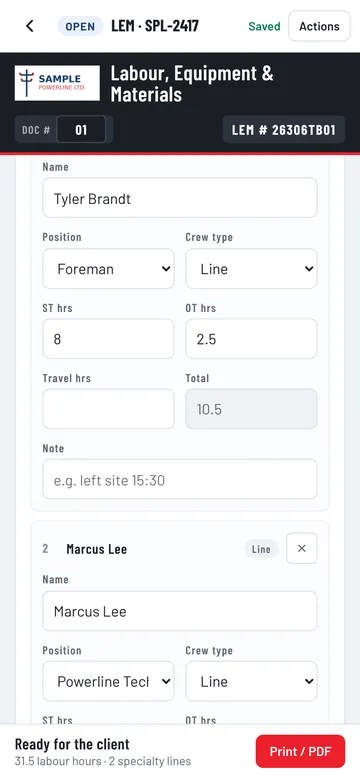
The LEM is drafted for you
When the foreman closes out the FLRA, the LEM is drafted: straight time and overtime from the start and close-out times, plus the specialty equipment. The foreman checks and corrects each person’s hours before the client sees it, and every change is kept.
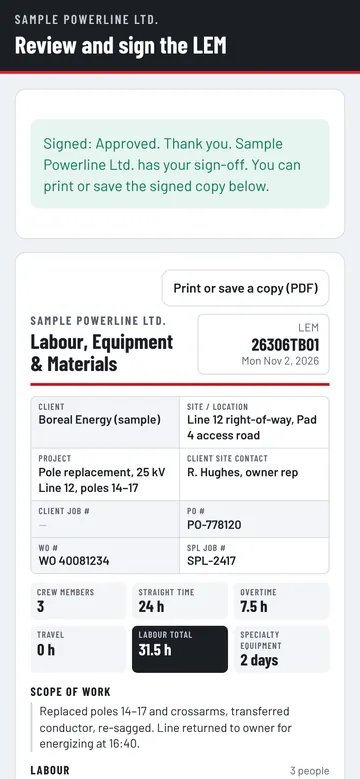
Signed by the client, locked
The owner’s rep reviews the LEM with the PO, work order, hours and scope, then approves, comments or disputes. The signed copy is locked, and both sides can print it.
Works with no signal
Signed in the bush. Proven in the office.
Plenty of job sites have no signal. The app doesn’t mind: forms are saved on the phone and sync when it’s back in range.
- 1The owner’s rep signs on the foreman’s phone, no account needed.
- 2The LEM is locked the moment it’s signed.
- 3It gets a fingerprint: a short code worked out from the signed record. Change one character later and it no longer matches, so any change shows.
- 4Back in range, it syncs. Billing gets a copy automatically.
Add-on · Permits
The permit stays the owner’s. The sign-ons live on the phone.
The site owner issues the safe work permit; the app doesn’t replace it. Client permits are added from the FLRA, each worker signs on, and they’re handed back at the end of the day. Left early? Signed off for, with the reason.
From $2,500 setup + $150/mo1–25 people who sign in · CAD, plus GST · fixes and updates includedAll prices
The office side
What lived in binders, kept current by the crews.
- FLRA and JHATemplates by job type, hazards with controls and risk ratings, crew sign-on after the hazards.
- Truck and gear checksDaily walk-arounds; defects raise actions; out-of-date gear stops the truck. The yard add-on.
- Near missesAnyone can file one on the spot: what happened, what was done, who was told.
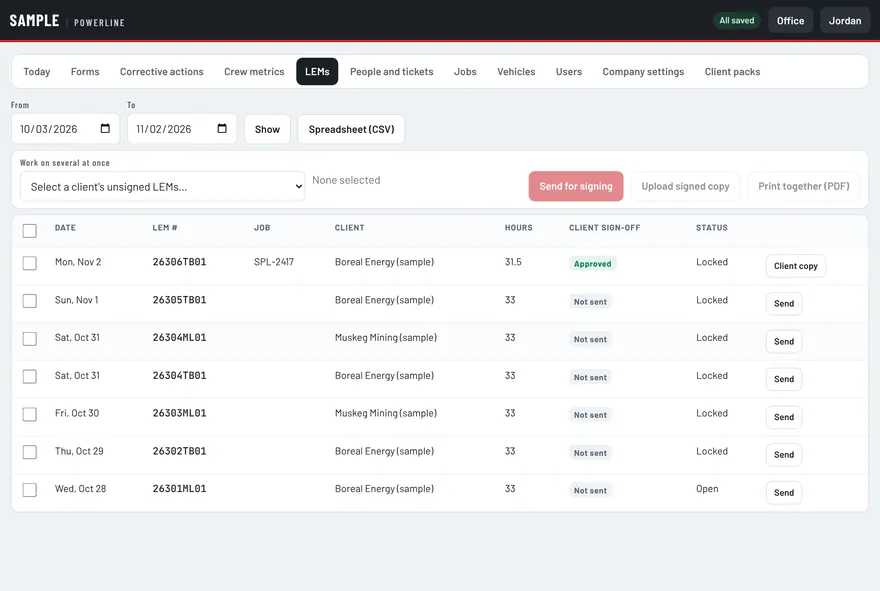
- LEM and client signatureBuilt from the crew’s day; signed on site or by link; approved, commented or disputed.
- Priced in the officeRates go in after the client signs, so the field never sees them. Every change is kept.
- Tickets by personGreen is fine, orange expires within 30 days, red has expired. A copy can sit behind each one.
- Corrective actionsRaised from reports or by the office, assigned with a due date, overdue ones flagged, closed with a signed sign-off.
- Safety records packageHazard assessments, JHAs and FLRAs, pre-use inspections, near misses, incidents and investigations, and the corrective action log, for the dates and client you pick, with every fingerprint checked. What it doesn’t cover
- Hours for payrollLEM hours by person export as a spreadsheet. Nobody types them in again.
What the safety records package doesn’t cover: planned site inspections, safety meetings and toolbox talks, the training matrix and orientation, drills and safety statistics. Those come from your own program. No software can certify you: COR certification is your Certifying Partner’s decision.
Questions
About the crew app.
Priced by company size, not per seat. Fixes and updates included in every monthly.
Does the app work with no signal?
Yes. Crews fill in and sign forms with no signal. Everything is saved on the phone and syncs when it is back in range.
Do crews need a work email or an app store?
No. The sign-in code goes to any email address, or the foreman signs the crew on from his phone. It runs in the phone’s browser; nothing to install from a store.
Does it track where my crews are?
Location is stamped only on the forms you fill in, when a form is opened and saved, to show where the work was done. It is never tracked in between. The phone asks first, and you can say no.
Who sets my hours on the LEM?
The LEM is drafted from the day’s records: straight time and overtime from the FLRA start time to its close-out. The foreman checks each person’s hours and corrects them before the client signs, for a late start, an early finish or travel, with a note on the line. Every saved change goes into the record’s history with who made it and when, and the client’s rep signs the final hours. Once signed, the LEM is locked.
Can we keep our own forms?
Yes. We build the app around the FLRA, JHA, truck check and LEM your crews already use, so the paperwork looks familiar on day one.
Does the client need an account to sign a LEM?
No. The client’s representative signs on the foreman’s phone on site, or from a link sent by text or email. They can approve, comment or dispute.
What does “fingerprinted” mean?
A fingerprint is a short code worked out from a signed record (a cryptographic hash). Change one character later and the code no longer matches, so any change shows. It prints on the signed copy and on the audit report.
Does it make us COR certified?
No software can. It keeps the records the app holds dated, signed and change-tracked, and puts them in a safety records package for your auditor. Your audit still includes interviews and observation, and certification is your Certifying Partner’s decision.
What’s in the safety records package?
For the dates you pick, for one client or all of them: hazard assessments, JHAs and FLRAs, pre-use inspections, near misses, incidents and investigations, and the corrective action log, each record with its history and a fingerprint check. What it doesn’t cover: planned site inspections, safety meetings and toolbox talks, your training matrix and orientation, drills and safety statistics come from the rest of your program.
The rest of the suite
One system. Each part feeds the next.
Next step
Send us one FLRA and one LEM.
We’ll show you both running on a phone in 30 minutes. Then the app runs 30 days on your real jobs before the first monthly fee.
Fort McMurray, Alberta · serving contractors across Canada